

Welcome Center Ambassador Volunteer Information
 Access to the Space
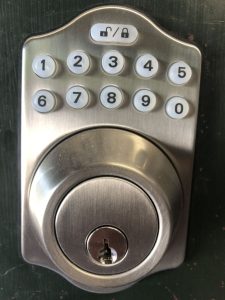
If the Welcome Center is not open when you arrive you can access the space with the keyless entry pad on the door (see image). The combination weill be provided to you by the Chamber director. Punch in the numbers and then press the lock/unlock key. If you leave and there is no one to relieve you press the lock/unlock key on your way out to lock the door.
WiFi
Network – MRV Welcome Center
Password – 1luvmrv!
Please feel free to share with all visitors that need it. There are plexi-framed signs by the front door and the reception desk, so you can just point them out to folks.
Procedures
When you come in:
- Put out the”Open” flag out front
- Turn on the Touch Screen Itinerary Builder Kiosk
- Turn on both banks of lights
- Turn on the MRV neon sign above the fireplace
- Turn on the TV monitors with local web cams (Covered Bridge, Warren Store, MRG, Sugarbush, etc….)
When you leave:
If there is no one to take over after your shift please be sure to:
- Take in the”Open” flag out front
- Turn off the Touch Screen Itinerary Builder Kiosk
- Turn off both banks of lights
- Turn off the MRV neon sign above the fireplace
- Turn off the TV monitors
- Lock door when you leave by pressing lock/unlock icon on the door key pad.
- Double-check that the lock actually locked!
Lights
There are two banks of light switches.
- The first is on the wall to the left of the TV monitors. You will see a remote control above the light switch which operates the two ceiling fan lights. You can adjust the light and fan from that. If that isn’t working it is likely that someone turned off the light switch attached to each fan. Simply turn the switch back on and the remote should work again.
- The second bank of lights are the two switches on the left end of the Ambassador Reception Desk. These dimmable switches operate all of the track lighting in the space.
Neon MRV Light
The super-cool MRV neon light above the fireplace is operated by the white remote control velcro-ed to the left side of the Ambassador reception desk
Touch Screen Itinerary Builder Display
This is the display in the entry way to the Welcome Center. It is designed to give visitors a way to create a list of all the things they want to do when they are here. This includes hiking trails, swim holes, bike routes, dining options, places to stay, retail shops, events and much more. They can then text, email or print out a custom itinerary that provides direct links to the website and directions to get there. This makes it easier for our ambassadors so they don’t necessarily have to know everything. It also makes it unnecessary to provide directions and maps for folks.
Please note that this is the same content available on the MRV Community Calendar.
Computer
The reception desk computer is available for your use (just hit enter at the login, there is no password). You can use it to stream video to the new TV on the wall. it is also available to share information with our guests. Its hooked up to the small printer in the office.
TV Monitor
There are two monitors. The TV’s black Samsung remote controls are velcroed to the wall to the left of the reception desk. Please keep them there.
Most common things to put up are the Live Webcams from the MRV.
Restrooms
The bathrooms are located in the hallway between our space and the restaurant and they are available to our visitors. They are VERY popular!
 Recreational Trail Maps
If someone wants to purchase one of the Trail Maps on the Reception Desk they can do so by purchasing them online using their credit cards. Have them go to our website at www.madrivervalley.com and look for the shopping cart icon on the right side of the blue banner on the home page (see image below). From there they can scroll down to the map product description and add it to their carts. If they want to pay with cash they can but I don’t have a cash box so they will need exact change. Just put the cash under the base of the reception desk computer. I will come up with a better solution shortly.
Other On-line sales
If a visitor ever needs to purchase a Star Kit, trail map or anything else we might be offering please direct them to our Online Shopping Portal
www.madrivervalley.com/shop/
Starting Pellet Stove Instructions:
- Find the control panel on the left side of the the stove
- Push the bottom right button once – It will get the stove startedThe lights will start flashing saying that it is warming up.
- Don’t touch anything when the lights are flashing
- You will notice a red light on the left side of the panel – that is the temperature control.
- Push the yellow button to crank it up, you will see the red light go up.
Quick Links
Procedures / Daily Checklist
What needs to be done
Commonly Asked Questions
You’ll be surprised what folks want to know!
Food & Drink
Specific recommendations based what people are looking for.
Where to Stay
So many great options along with a tool to determine occupancy by date.
Trails
Trail recommendation by ability level along with an area map with links to individual trails.
Swimming
A guide to swimming hole options all around the MRV.
VermonTouring
Driving tour suggestions near and far.
Things for Kids
Lots of options for the kiddos.